


Craftsman: Building Craft
3.518.91K Reviews
App Specs
- Version
- 1.91
- Updated On
- License
- Free
- Downloads
- 100,000,000+
- Developer
- StarGame12
- Categories
- Simulation
- Platform
- Android
Screenshots
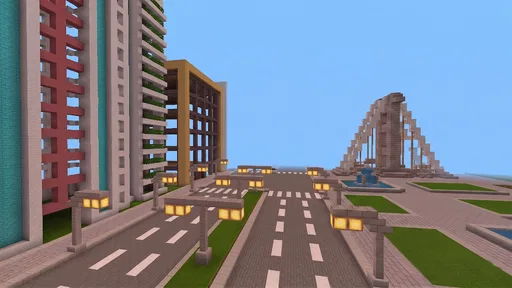

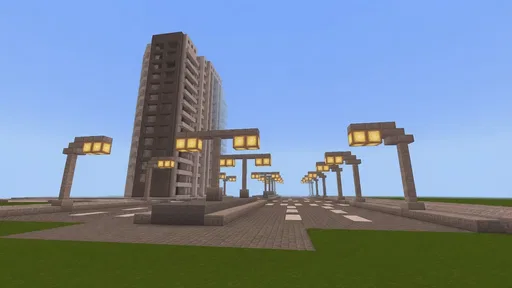
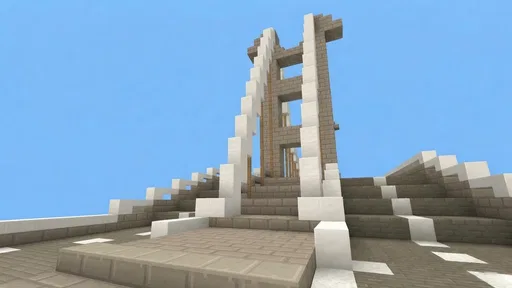
 Analysis by AppCompare
I often think of block-building games as digital boxes of bricks: satisfying when I have a plan, but easy to abandon if starting feels like work. Craftsman: Building Craft makes that first step approachable. I can picture it working well on a shared household device, where one person wants to sketch out a castle and another would rather make a small home. The important practical question is how you use the same game without assuming that everyone shares the same goals or progress.
A game that can fit a shared afternoon
For a relaxed session, I’d treat the game as a place to make one manageable project together rather than a contest to build the biggest structure. A child might choose the shape of a house, while an adult helps think through a doorway, roof, or path. That gives each player a concrete role and makes it easier to pause when the household needs the device back.
There’s also a useful distinction between building side by side and taking turns. If several people are sharing one screen or device, agree on a small plan before placing blocks: decide what the structure is for, which part each person will handle, and when to stop. That simple routine avoids the familiar argument where one player dismantles the other’s work in the name of “improving” it.
Set expectations before handing over the device
I would not assume that a shared device automatically means shared game progress or that every player will have a separate place to keep creations. Before making a detailed build, check how the game is currently arranged on your device and decide who is using it. If the setup does not provide the separation your household wants, keep projects modest and take turns deliberately rather than promising that everyone will have an independent world.
That boundary matters most when someone has spent a long time on a design. A quick household agreement—ask before changing another person’s structure, and leave the device in the state you found it—can prevent a lot of frustration. For younger players, I’d also make clear that sharing a device is not the same as sharing personal account details or other private information.
Coordinate projects without turning play into a chore
When a few people want to contribute, a build works better if it has a simple shared purpose. A courtyard, a small village street, or a castle entrance gives everyone a clear piece to work on without requiring a complicated blueprint. I’d start with the outline and entrances, then add decoration; that order makes a structure easier to use and reduces the chance that the group spends its whole session debating tiny details.
A practical tip is to agree on a visual rule before building—perhaps one material for the main walls and another for the roof. This is not about making a perfect design. It gives different builders a way to make separate contributions look intentional, and it helps a returning player understand what the group was trying to create. If tastes clash, make contrasting rooms or sections instead of repeatedly rebuilding the same wall.
Worth Reading Before You Choose

Flipboard Shows What News Apps Must Do Beyond the Feed

Switching to Android Auto Means Rethinking Your Driving Routine

Google Calendar Makes a Crowded Week Easier to Manage

Ludo King Makes the Most of the Minutes Between Plans

Baby Panda World Brings Quick Play to Modern Phones, but Its Game Library Feels Busy

ESPN’s Live Game View Makes Following Close Games Easier
Age, trust, and the right kind of supervision
This is a creative simulation game from StarGame12, and its age guidance is Everyone 10+. That gives families a useful starting point, but it does not replace a parent’s judgment about a particular child, device, or play situation. I’d pay attention to whether a young player is comfortable navigating the game and whether household expectations around sharing and screen time are clear.
The game is free to download and has in-app purchases listed at $0.99 per item, so I’d explain that optional purchases may be available before handing over a device. A child should know to ask before spending, especially if the device is used by more than one person. That is a general household boundary, not a claim that the game provides a particular parental-control feature.
Its public reception is mixed but substantial: it has a 3.5 average from around 3.7 million ratings, alongside roughly 19,000 written reviews and over 100 million installs. I’d read that as evidence that many people have tried it, not as a guarantee that every household will find it equally polished or suited to its habits.
Who will enjoy it, and who may want another option
I think it suits players who like arranging spaces, experimenting with block shapes, and making their own goals. It can be a good choice for a short creative break, a low-pressure building session, or a shared activity where the fun comes from seeing an idea take shape. It is less suited to someone who wants a guided campaign, a carefully explained learning path, or a tightly structured set of missions; the appeal here is largely in deciding what to make for yourself.
Compared with other voxel-building games, its familiar visual language makes the basic idea easy to grasp, while its free entry point lowers the commitment for a curious player. The trade-off is that people looking for a more distinctive presentation or a clearly guided progression may prefer another simulation game. If you mainly want a solo creative tool, a game with stronger project organization may also be a better fit than sharing a device and negotiating turns.
Version, cost, and a sensible first session
The current version is 1.91, it is free, and it requires Android 6.0 or later. I’d check that a device meets the requirement before planning a group session, then start with a small build rather than promising an elaborate castle. A simple first project makes it easier to judge whether the controls and pace suit the people using the device without investing a whole afternoon.
One helpful way to use the first session is to set a stopping point in advance: build the basic shape of a house, decide what each room is for, and leave decorative details for another time. That keeps the experience welcoming for a newcomer and gives a returning player an obvious next step. If the group loses interest, the session still ends with something recognizable rather than a half-finished plan that depends on everyone coming back.
My household verdict
For households that enjoy making things together, I see Craftsman: Building Craft as an easygoing option, provided everyone agrees on how to share the device and respect each other’s work. The game’s building focus gives players room to contribute at different levels, but it does not remove the need to coordinate. I would choose it for an informal creative session, not as a substitute for a structured multiplayer experience or a guaranteed way to keep several people’s projects separate.
If you’ve ever found yourself lost in the world of voxel-based building games, then Craftsman: Building Craft might just be the next app to fuel your creative fire. I decided to dive headfirst into this blocky universe and see what all the fuss is about. Let me tell you, it’s quite the adventure!
Getting Started with Craftsman
From the moment I launched Craftsman: Building Craft, I was greeted with a familiar, yet inviting interface. It’s clear where the inspiration comes from, but it holds its own charm. The graphics are simple yet colorful, making it appealing for anyone who loves pixelated aesthetics. As a first-time player, I found the navigation intuitive, with easy access to different game modes and options.
Exploring the Game Modes
One of my favorite things about Craftsman is the variety in gameplay. You can choose between creative and survival modes, each offering a different kind of challenge. In creative mode, the world is your oyster. I spent hours building elaborate structures without the worry of pesky mobs or limited resources. It’s a perfect place to let your imagination run wild.
Switching gears to survival mode, I was immediately thrust into a world where gathering resources and crafting tools became essential. It’s a thrilling experience, fighting off creepers and crafting my first shelter before nightfall. This mode adds a depth of strategy and urgency that keeps you on your toes!
The Building Experience
Building in Craftsman is nothing short of delightful. The controls are straightforward, making it easy to place and remove blocks as you see fit. I found myself building everything from towering castles to cozy cottages. The game offers a wide range of blocks and materials, enabling endless possibilities for creation.
What really stood out to me was the community aspect. You can share your creations with other players and even explore their worlds. It’s a fantastic way to gather inspiration and learn new building techniques. Plus, there’s a certain joy in showing off your creations to fellow enthusiasts.
Sound and Visuals
The sound design in Craftsman complements its visual style perfectly. The soft, ambient music sets a calming tone while the subtle sound effects, like the crunch of footsteps or the sound of placing a block, add to the immersion. The visuals, while not groundbreaking, are charming and serve the game’s purpose well. They keep the focus on creativity and exploration, which is exactly where it should be.
Performance and Usability
Running Craftsman on both Android and iOS, I was pleased with its performance. It runs smoothly without any noticeable lag, even when my builds got a bit ambitious. The app’s lightweight nature means it doesn’t demand a lot from your device, making it accessible for a wide range of users.
The controls are responsive, and I didn’t encounter any frustrating glitches or bugs. It’s clear that the developers have put thought into ensuring a user-friendly experience, which is always a big plus in my book.
Final Thoughts
Overall, Craftsman: Building Craft is a delightful addition to the genre. Whether you’re an experienced builder or just getting started, it offers something for everyone. I was particularly impressed by its simplicity and the sense of community it fosters among players. It’s more than just a game—it’s a platform for creativity and connection.
If you’re looking for a game that lets you build, explore, and survive, all while enjoying the charm of voxel graphics, then Craftsman is worth every minute. Grab your toolkit, fire up the app, and start crafting your world today!
Pros
- Intuitive controls make building easy.
- Large
- open-world environment to explore.
- Crafting system offers diverse options.
- Multiplayer mode enhances social play.
- Regular updates add new features.
Cons
- Graphics can feel outdated.
- Occasional in-game lag issues.
- Limited customization for characters.
- Some features require in-app purchases.
- Ads can be intrusive at times.
FAQs for Craftsman: Building Craft
What is Craftsman: Building Craft about?
Craftsman: Building Craft is a sandbox-style building game that allows players to construct their own worlds using various materials and tools. It's similar in concept to Minecraft, where creativity is key, and players can explore, create, and survive in a pixelated universe. The game provides both creative and survival modes for different gameplay experiences.
Is Craftsman: Building Craft free to play?
Yes, Craftsman: Building Craft is free to download and play. However, it may contain in-app purchases and ads that can enhance the gaming experience or offer additional content. Players can choose to purchase these optional items or continue enjoying the game without spending any money.
What platforms is Craftsman: Building Craft available on?
Craftsman: Building Craft is available on both Android and iOS platforms. Users can download the app from the Google Play Store for Android devices or the Apple App Store for iOS devices. Make sure your device meets the necessary system requirements for a smooth gaming experience.
Does Craftsman: Building Craft support multiplayer mode?
Currently, Craftsman: Building Craft primarily focuses on single-player experiences, allowing users to build and explore on their own. However, there may be updates or future versions that incorporate multiplayer features, so it's always a good idea to check for updates or developer announcements.
What are the system requirements for Craftsman: Building Craft?
To run Craftsman: Building Craft smoothly, ensure your device has sufficient storage and processing power. For Android, a minimum of Android 4.2 is recommended, while iOS users should have at least iOS 9.0. Adequate RAM and available space are also essential for optimal performance.


